Build order
Discovery collects everything at once. The build doesn't happen all at once — it stacks. Each layer is a prerequisite for the one above it, so a gap low in the stack stalls everything resting on it, and the fix is rarely quick because the missing piece usually has a lead time attached to it.
That's why the workbooks ask for things that feel far away from a working phone. Sites, extension length, and emergency addresses all have to be settled before a single user can be licensed or a single call routed.
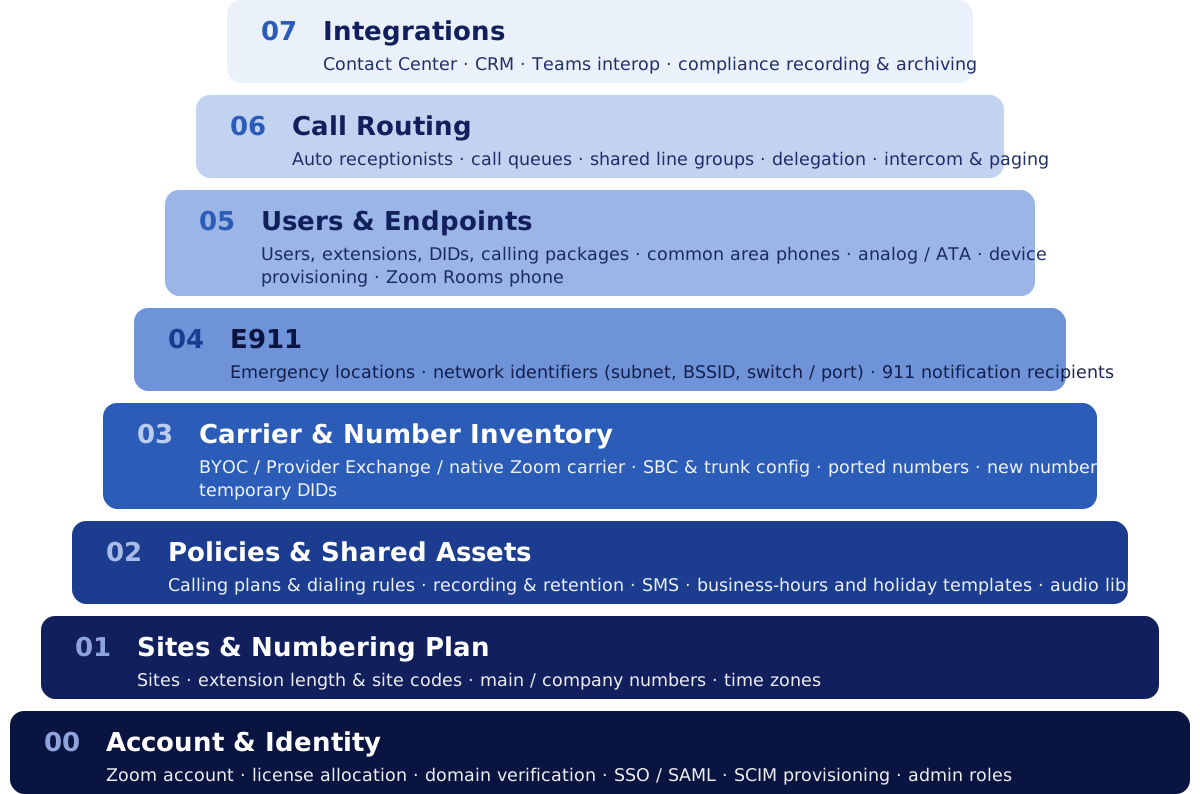
| # | Layer | Where the information comes from |
|---|---|---|
| 00 | Account & Identity | Day 1 Access & Information |
| 01 | Sites & Numbering Plan | Pre-Discovery Questions · Company Info |
| 02 | Policies & Shared Assets | Account Settings · Holiday Settings · SMS & 10DLC |
| 03 | Carrier & Number Inventory | Number Porting & CSR · BYOC |
| 04 | E911 | E911 Locations & Network |
| 05 | Users & Endpoints | Users & Devices |
| 06 | Call Routing | Auto Receptionists · Call Queues · Shared Lines |
| 07 | Integrations | — |
00. Account & Identity
Covers: Zoom account · license allocation · domain verification · SSO / SAML · SCIM provisioning · admin roles
Nothing exists until the tenant does. Domain verification and how identity is handled — SSO, SAML, SCIM provisioning — decide how user accounts get created and matched, so settling it here avoids duplicate accounts that have to be reconciled by hand later. Admin roles and RX3's delegated access belong to this layer too: without them, work on every layer above is blocked on someone else's screen share.
01. Sites & Numbering Plan
Covers: Sites · extension length & site codes · main / company numbers · time zones
A site carries the address, business hours, and time zone that everything assigned to it inherits, so the site list has to exist before there is anything to assign. Extension length and site codes are the decisions that are hardest to walk back — they are what every user, queue, and printed directory is numbered against.
Extension length is close to a one-way door
Changing extension length after users exist means renumbering everyone, and re-recording any greeting that reads an extension aloud. We ask about multiple sites in the pre-discovery questions for exactly this reason.
02. Policies & Shared Assets
Covers: Calling plans & dialing rules · recording & retention · SMS · business-hours and holiday templates · audio library / MoH
Account-level policy and the shared objects that everything above inherits rather than defines. This is what the Setup Review covers, and it runs before the build rather than after it — a recording or retention policy set once users are live governs what happens next, not what already happened.
Holiday sets, business-hours templates, and greetings are shared assets on purpose: build them once here, then point every auto receptionist and queue at them instead of maintaining the same closure date in nine places.
SMS is the outlier in this layer. 10DLC brand and campaign registration is reviewed by an outside party, so it takes weeks and can't be compressed — it starts early even though nothing above it is blocked yet.
03. Carrier & Number Inventory
Covers: BYOC / Provider Exchange / native Zoom carrier · SBC & trunk config · ported numbers · new numbers · temporary DIDs
Numbers can't be assigned before they exist in the account, and how they get there depends on the carrier decision: native Zoom carrier, Provider Exchange, or Bring Your Own Carrier with its own SBC and trunk configuration.
This layer is the one we control least. Porting runs on your losing carrier's clock — 5 to 30 business days — which is why the port request starts on day one even though it sits in the middle of the stack. Where a number won't arrive in time, temporary DIDs let the layers above be built and tested on schedule and swapped to the real number at cutover.
04. E911
Covers: Emergency locations · network identifiers (subnet, BSSID, switch / port) · 911 notification recipients
Every endpoint has to be dispatchable the moment it registers, so emergency locations and the network identifiers that map a device to one come before the devices, not after. Subnets, BSSIDs, and switch ports usually have to be pulled from your network team rather than from telecom, so that request has a lead time of its own — it is collected in the E911 Locations & Network workbook.
05. Users & Endpoints
Covers: Users, extensions, DIDs, calling packages · common area phones · analog / ATA · device provisioning · Zoom Rooms phone
Everything below converges here: a license from 00, a site and extension from 01, a calling package from 02, a number from 03, and an emergency location from 04 all land on one user row. That makes this the layer where a gap lower in the stack finally shows up — usually as a user who can be created but not called.
Names and email addresses captured in the Users & Devices workbook are the join keys the routing layer above is built from, so they have to match character for character across workbooks. See How the workbooks work.
06. Call Routing
Covers: Auto receptionists · call queues · shared line groups · delegation · intercom & paging
Routing is assembled out of members and destinations that already exist. A queue can't take members before those users are built, and an auto receptionist can't send a caller to a queue that isn't there yet. Routing that points at itself — a queue overflowing to another queue that overflows back — is built in two passes: every object first, then the destinations between them.
07. Integrations
Covers: Contact Center · CRM · Teams interop · compliance recording & archiving
Integrations attach to a finished phone system: they consume the users, numbers, and routing built below them. They come last because each one needs something stable to attach to, and because most of them involve a third party working to their own change window.
What this means for discovery
Fill the workbooks in whatever order suits you — the build order is ours, not yours. What it changes is which answers we chase first, and why we push on questions that look premature.
RX3 recommends: start the long-lead items on day one
Port requests, 10DLC registration, and network data from your team all wait on someone outside the project. They sit at layers 02, 03, and 04, but none of them can be rushed later, so they start immediately regardless of where they fall in the stack. The Day 1 checklist is that list.